
Choosing a content management system used to be mostly a question of templates, plugins and publishing workflows. In 2026, the decision is broader.
A modern CMS may need to serve a marketing site, documentation, product pages, structured content, mobile applications and AI-assisted editorial workflows at the same time. Some teams want the familiarity of WordPress. Others want an API-first headless architecture. Others simply want a fast publishing experience with as little operational overhead as possible.
Open-source CMS platforms remain attractive because they give teams more control over hosting, integrations and source code. But “open source” does not mean every platform solves the same problem.
This guide compares 10 strong open-source CMS options and explains an increasingly important distinction: your CMS does not have to be your entire content operations system.
Best open-source CMS platforms at a glance
| CMS | Best for | Architecture | Self-hosted |
| WordPress | General-purpose publishing | Traditional / REST-capable | Yes |
| Ghost | Publishing and newsletters | Traditional / API-capable | Yes |
| Drupal | Complex enterprise content | Traditional / headless-capable | Yes |
| Joomla | Flexible general-purpose sites | Traditional | Yes |
| Payload | Developer-first applications | Headless / code-first | Yes |
| Keystone | Custom content applications | Headless | Yes |
| Wagtail | Editorial teams using Django | Traditional / headless-capable | Yes |
| Grav | Fast flat-file websites | Flat-file | Yes |
| Decap CMS | Git-based static sites | Git-based headless | Yes |
| Umbraco | .NET content platforms | Traditional / headless-capable | Yes |
The right choice depends less on which product has the longest feature list and more on how content needs to move through your organization.
What is an open-source CMS?
An open-source content management system makes its source code available under an open-source license that allows users to inspect, run and modify the software according to the terms of that license.
For a content team, that can mean several practical benefits:
- self-hosting on infrastructure you control
- the ability to inspect or modify application behavior
- a large ecosystem of community extensions
- less dependence on one hosted vendor
- more freedom to build custom integrations
- clearer long-term portability
However, open-source software still has costs. Hosting, maintenance, upgrades, security, backups, development time and third-party services all matter.
The question is not whether open source is “free.” The question is whether ownership and flexibility are valuable enough to justify operating more of the stack yourself.
Traditional CMS vs headless CMS
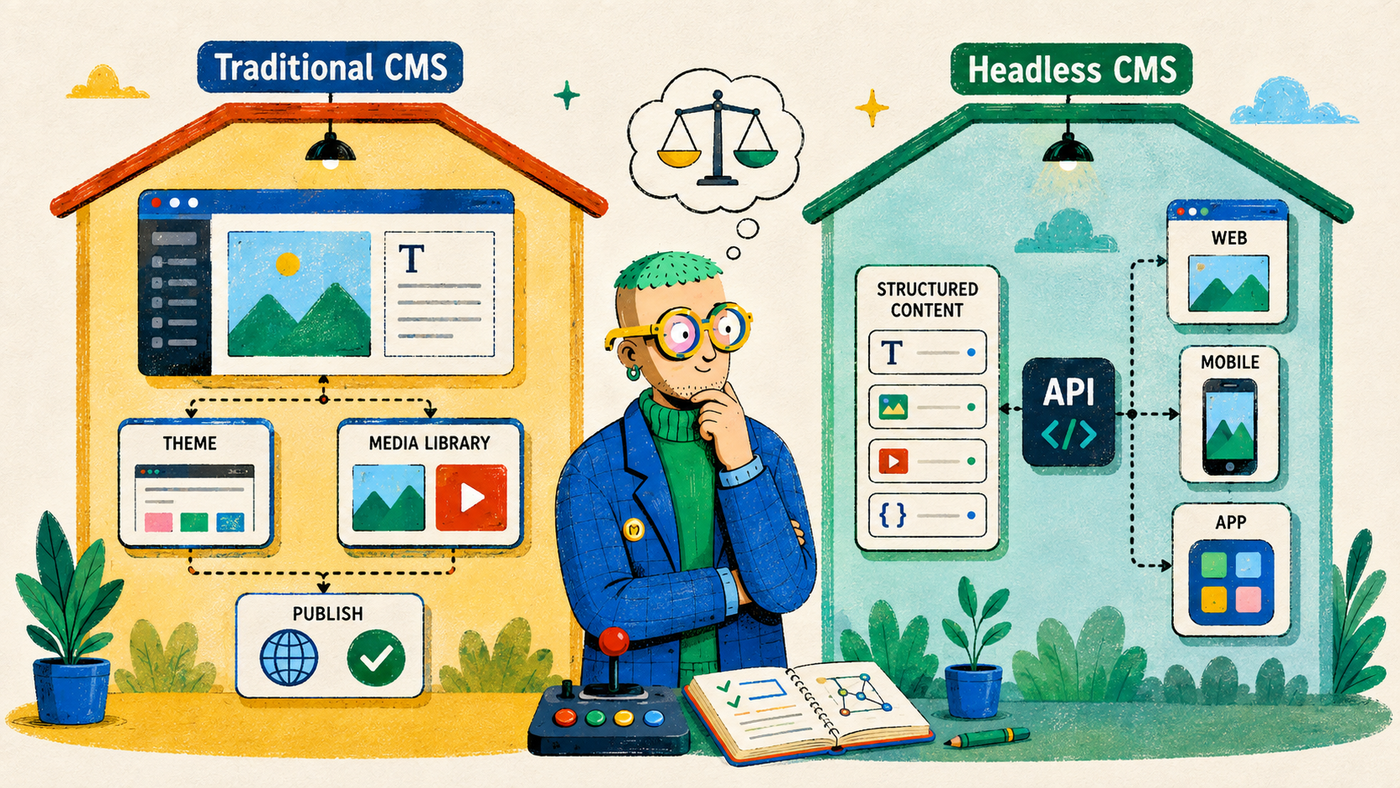
Before choosing a platform, it helps to separate two broad models.
Traditional CMS
A traditional CMS usually combines the admin interface, content database, rendering system and website publishing workflow in one product.
WordPress, Ghost and Joomla are familiar examples.
This can be the fastest path when your primary goal is running a website or publication.
Headless CMS
A headless CMS focuses on managing structured content and exposing it through APIs. The front end is built separately using frameworks such as Next.js, Nuxt, SvelteKit or a mobile application stack.
Payload and Keystone are closer to this model.
Headless architecture is powerful when the same content must feed multiple experiences, but it requires more engineering.
Neither approach is automatically better for SEO. Search performance depends on how the final site is rendered, crawled, structured and operated.
1. WordPress — best open-source CMS for the broadest ecosystem
WordPress remains difficult to ignore because its ecosystem is enormous.
It can power a simple blog, a corporate site, a media publication, an ecommerce store or a highly customized content platform. Themes, plugins, hosting providers, developers and integrations are available almost everywhere.
For SEO teams, that ecosystem is both a strength and a weakness. You can implement nearly any workflow, but a poorly maintained WordPress stack can accumulate plugin conflicts, security issues and performance problems.
WordPress is often the safest choice when editorial users need a familiar interface and the organization does not want to build a custom publishing system from scratch.
Best for: general-purpose websites, publishing teams and organizations that value ecosystem depth.
2. Ghost — best for independent publishing and memberships
Ghost is focused on publishing rather than trying to become a universal website builder.
Its editor is clean, its architecture is relatively focused and it includes features for newsletters, subscriptions and memberships. That makes it especially attractive for publications, creator businesses and companies using content as a direct audience channel.
Ghost can be self-hosted or used through hosted services. It also exposes APIs, which makes it possible to use it in more customized front-end setups.
Best for: blogs, media publications, newsletters and membership-driven content.
3. Drupal — best for complex enterprise content models
Drupal has a long history in organizations that need complex permissions, structured content and highly configurable information architecture.
It is often used for government, education, enterprise and large institutional websites where content types, roles, multilingual requirements and governance become more important than a simple blogging experience.
The tradeoff is complexity. Drupal can be extremely powerful, but teams usually benefit from experienced developers and a disciplined maintenance process.
Best for: large organizations with complex content structures, permissions or governance requirements.
4. Joomla — best traditional alternative for flexible site management
Joomla sits between simple publishing platforms and highly configurable enterprise systems.
It offers traditional CMS features, extensions, templates and user management while remaining open source and self-hostable.
It receives less attention than WordPress in many marketing conversations, but it remains a legitimate choice for teams that already understand its ecosystem or prefer its approach to content and permissions.
Best for: general-purpose websites that want an established traditional CMS outside the WordPress ecosystem.
5. Payload — best developer-first open-source CMS
Payload has become a popular choice among teams that want the CMS to feel like part of the application codebase rather than a separate black-box service.
It is developer-oriented, TypeScript-friendly and suited to projects where custom schemas, authentication, application logic and content management need to live close together.
For modern product teams, that can simplify architecture. Instead of forcing an application to adapt to a rigid external CMS, developers can shape the content layer around the product.
The tradeoff is that Payload assumes more technical ownership than a hosted drag-and-drop CMS.
Best for: engineering teams building custom content-heavy applications.
6. Keystone — best for custom Node.js content applications
Keystone is another open-source framework for building content management and application backends.
Rather than prescribing a complete website experience, it gives developers tools for schemas, APIs, authentication and an administrative interface.
This makes it useful when the content model is specific to the business and developers want strong control over how data and editorial interfaces are constructed.
Best for: Node.js teams building a custom CMS-backed application.
7. Wagtail — best CMS for Django teams
Wagtail is an open-source CMS built on Django and has a strong reputation for editorial flexibility.
It is a natural fit for organizations already using Python and Django, especially when developers need a robust framework while editors need a usable content interface.
Wagtail can support complex content models and can also be used in headless scenarios when the front end is separate.
Best for: Python/Django organizations that need a serious editorial CMS.
8. Grav — best lightweight flat-file CMS
Grav takes a different approach from database-heavy content platforms. It is a flat-file CMS, which means content can be stored in files rather than requiring a traditional database architecture.
That can make deployments, backups and versioning simpler for smaller sites. It is also appealing to technically comfortable users who want a lightweight system without the operational surface area of a large CMS.
The tradeoff is that flat-file architecture is not ideal for every content model or team size.
Best for: smaller sites, documentation and teams that value a lightweight file-based architecture.
9. Decap CMS — best Git-based CMS for static sites
Decap CMS is designed around Git-based content workflows.
Instead of storing content in a separate proprietary content database, editors can manage content that ultimately lives in a Git repository. That makes it a natural fit for static-site generators and developer-oriented publishing systems.
The model is especially attractive when content version history and code deployments already revolve around Git.
It is less appropriate when editors need a deeply relational content platform or complex real-time workflows.
Best for: static sites and teams that want content changes represented in Git.
10. Umbraco — best open-source CMS for .NET teams
Umbraco is a mature open-source CMS in the .NET ecosystem.
For organizations standardized around Microsoft technologies and C#, it can be a much more natural fit than introducing a PHP, Python or Node.js CMS purely for content management.
It supports traditional content management and can be extended into more customized architectures.
Best for: .NET organizations that want an established open-source CMS.
Which open-source CMS is best for SEO?
There is no CMS that automatically ranks well because of its brand name.
A CMS affects SEO through the capabilities and constraints it gives your team. The important questions include:
- Can you control titles and meta descriptions?
- Can you create clean canonical URLs?
- Can you manage redirects?
- Can you generate and maintain XML sitemaps?
- Can you control robots directives?
- Can developers improve performance?
- Can editors create useful internal links?
- Can structured data be implemented cleanly?
- Does the rendering architecture expose indexable content reliably?
- Can the team update old content without creating operational chaos?
WordPress can be excellent for SEO or terrible for SEO. The same is true of a headless stack. Architecture creates possibilities; execution determines the result.
What changes when AI agents start creating content?

This is where the CMS discussion becomes more interesting.
Historically, a human writer opened the CMS, wrote or pasted content, previewed the page and clicked publish.
Now a team might have an AI agent researching keywords, another process analyzing Search Console, a model generating a draft and an automation sending content into the CMS.
Giving all of those systems direct publishing credentials is possible, but it creates a governance problem.
A CMS API is designed to let software perform CMS actions. It does not automatically understand your preferred editorial approval model.
That is why a separate content operations layer can make sense.
CMS vs content operations platform
A CMS and a content operations platform solve adjacent but different problems.
A CMS answers:
- Where is the content stored?
- How is it rendered?
- What URL does it publish to?
- Which fields exist in the content model?
- Who can edit or publish in the CMS?
A content operations platform answers:
- Why are we creating or updating this page?
- Which search or source evidence supports the work?
- Which revision is current?
- What did the agent change?
- Has the draft passed editorial and SEO checks?
- Which CMS destination should receive it?
- Is the agent allowed to perform that handoff?
This distinction is especially useful in AI-assisted workflows.
Where BlogFactory fits
BlogFactory is an open-source content operations platform rather than a CMS replacement.
It can sit between AI agents and your publishing destination:
Search and source evidence → AI agent → BlogFactory draft → review → CMS draft → human publish
BlogFactory’s MCP layer gives compatible AI clients access to approved content operations while keeping a narrow authority ceiling. Its workflow is intentionally designed around sending reviewed content to a CMS as a draft, not giving the agent a general-purpose live publish button.
That means you can keep WordPress, Ghost or another CMS you already like and improve the process happening before publication.
This separation also reduces lock-in at the workflow level. Your content operations process does not need to be rebuilt every time you change model provider or CMS destination.
How to choose an open-source CMS
Use these questions before making a shortlist.
1. Who edits the content?
A developer-first headless CMS can be elegant technically and painful editorially if the team needs a conventional publishing interface.
2. Where will the content appear?
If everything goes to one marketing website, a traditional CMS may be simpler. If the same structured content powers a web app, mobile app and other channels, headless architecture becomes more attractive.
3. How much infrastructure do you want to own?
Self-hosting means more control, but also backups, upgrades, security patches and monitoring.
4. How custom is the content model?
Highly specific product or application data often fits developer-first systems better than a generic blogging platform.
5. How important is the ecosystem?
WordPress has an enormous plugin and services ecosystem. Smaller platforms may offer cleaner architecture but fewer ready-made integrations.
6. How will AI interact with the system?
Do not only ask whether the CMS has an AI plugin. Ask what permissions an AI agent should actually receive and whether you want an approval boundary before content reaches production.
The best CMS may be the one that stays focused on being a CMS
The rise of AI does not mean every content tool should absorb every adjacent function.
A good architecture can be modular:
SEO data layer → agent layer → content operations layer → CMS → website
Each component can do the job it is best at.
That also makes future changes easier. You can replace the model without replacing the CMS. You can replace the CMS without redesigning your entire SEO research process. You can add a new agent without giving it unrestricted production access.
Open-source software makes that composability much more achievable.
Explore BlogFactory on GitHub
If you are evaluating an open-source CMS because you value control and extensibility, the same principles can apply to the workflow before content enters the CMS.
BlogFactory is open source and self-hostable, with an MCP-based content operations layer designed around review and CMS draft delivery.