
Content automation used to mean scheduling social posts, generating email sequences or moving data between a spreadsheet and a CMS.
Generative AI changed the scope of what can be automated.
Now software can research a topic, summarize sources, generate an outline, write a draft, create metadata, suggest internal links and even call publishing tools.
The technical ceiling is much higher.
That does not mean the safest workflow is to automate everything.
For most organizations, the best content automation system is one that automates the expensive repetitive work while keeping the final public decision explicit.
Open-source tools make that architecture especially interesting because teams can inspect, self-host and compose the workflow rather than giving one vendor control over research, generation, data and publishing.
What is content automation?
Content automation is the use of software to perform repeatable parts of the content lifecycle with less manual intervention.
It can include:
- identifying topics
- collecting research
- creating briefs
- drafting content
- generating metadata
- checking structure
- suggesting internal links
- routing content for review
- creating CMS drafts
- scheduling measurement
AI expands the range of tasks that can be automated because models can handle language and interpretation rather than only fixed rules.
The challenge is deciding where flexibility is useful and where deterministic controls are safer.
Why open-source content automation?
Closed SaaS platforms can automate content extremely well. Open source offers a different set of advantages.
Control over the workflow
You can decide which systems connect, where data is stored and which actions exist.
Model flexibility
You can design around multiple AI providers rather than making the entire operation dependent on one model vendor.
Self-hosting
You can run important parts of the stack on infrastructure you control.
Custom integrations
Developers can build directly against source code when standard connectors are not enough.
Permission design
You can create narrower agent capabilities instead of accepting a vendor’s all-or-nothing automation model.
Portability
A modular stack makes it easier to replace one layer without migrating the entire content operation.
The tradeoff is operational responsibility. Open source gives you more control because it gives you more to control.
What should you automate?
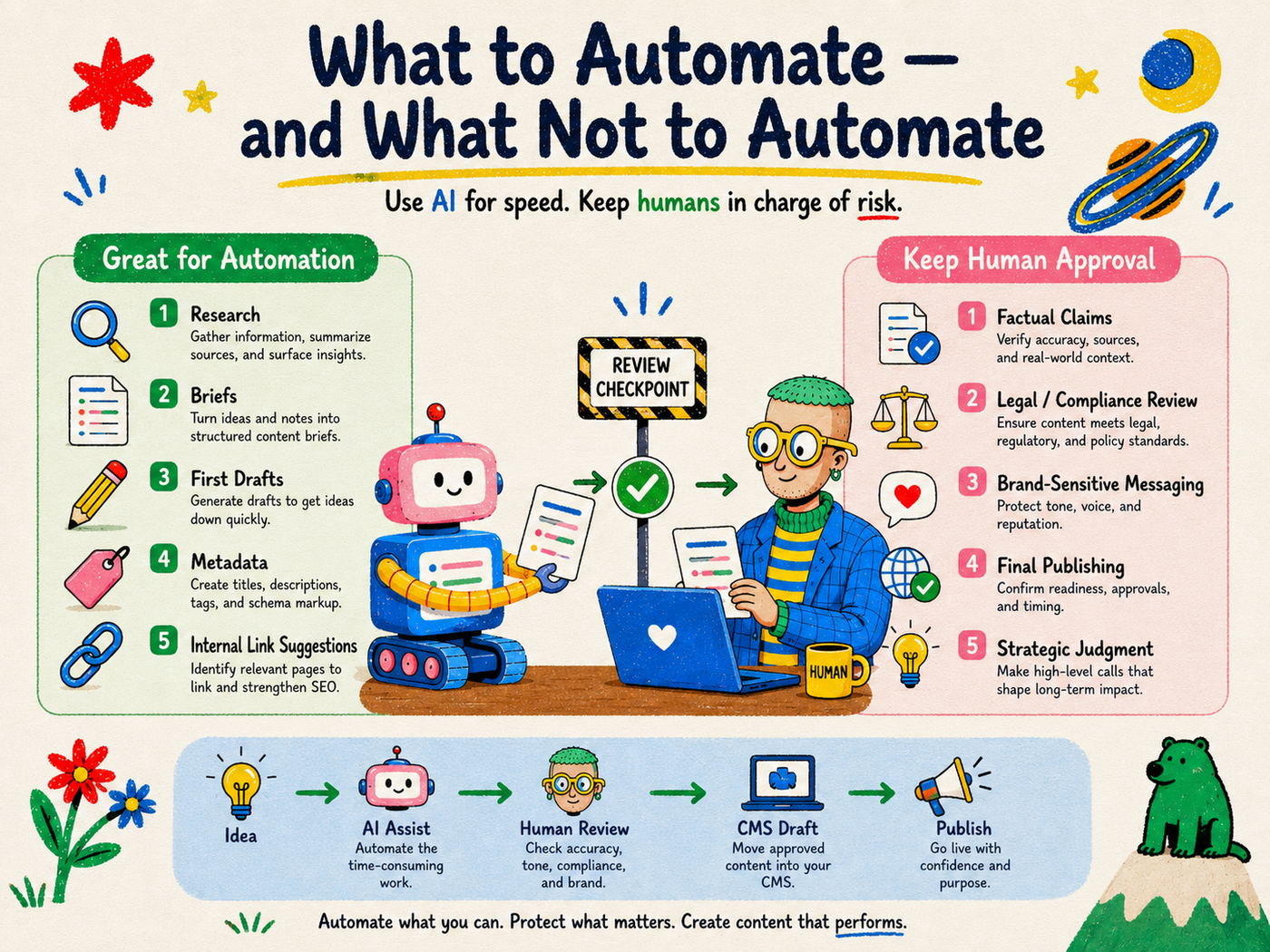
A useful rule is to automate tasks that are repetitive, reversible and easy to evaluate.
Research collection
Automation can collect:
- Search Console performance
- analytics data
- keyword metrics
- competitor pages
- documentation
- approved internal sources
The system can assemble this information before a human or agent starts writing.
Content inventories
Software can keep track of existing pages, metadata, status and destinations.
This reduces duplicate work and helps agents understand what already exists.
Opportunity detection
Rules can surface pages that meet defined conditions, such as:
- declining clicks
- growing impressions
- missing metadata
- outdated timestamps
- broken internal links
AI can then help investigate the cases that actually require interpretation.
Brief creation
An agent can convert research into a structured brief containing search intent, questions, headings, evidence and internal-link targets.
First drafts
Draft generation is one of the most obvious AI use cases.
The important distinction is to treat the output as a revision, not as final approved content.
Metadata
Title tags, meta descriptions, summaries, social copy and structured fields are good candidates for automated generation followed by validation.
Structural checks
Code can verify required fields, heading structure, link presence, length constraints and other deterministic requirements.
Internal-link suggestions
AI can propose semantically relevant links while deterministic systems verify that the URLs actually exist.
CMS draft creation
Once a revision has passed review, automation can transfer the content and metadata into the publishing system as a draft.
That eliminates tedious copying without automatically making the page public.
What should you not fully automate?
The answer depends on your risk tolerance, but several actions deserve caution.
Factual approval
A model should not be the sole authority for claims that can harm customers or the company if wrong.
Legal and compliance-sensitive content
Regulated or contractual claims require qualified review.
Brand-sensitive announcements
Layoffs, incidents, policy changes, executive communications and major launches deserve human ownership.
Destructive actions
Deleting content, bulk-changing URLs or removing large sections of a site should require explicit controls.
Live publishing
For many content teams, this is the easiest high-value boundary to preserve.
The system can automate everything up to the CMS draft and still save most of the labor.
The problem with fully autonomous publishing
The argument for full automation is simple: if the AI can write and the API can publish, why add a human click?
Because generation quality is probabilistic and publication is externally consequential.
Potential failures include:
- hallucinated facts
- outdated information
- accidental plagiarism-like phrasing
- duplicated topics
- wrong internal links
- broken formatting
- incorrect product claims
- publishing to the wrong site
- overwriting a newer revision
- keyword-stuffed copy
- an agent following malicious instructions from an external source
A staging boundary gives the organization time to catch these problems.
The most efficient automation is not the one with zero humans. It is the one that spends human attention only where it creates meaningful risk reduction.
Human-in-the-loop content automation
“Human in the loop” can sound like a vague safety phrase. It is more useful when the loop is explicit.
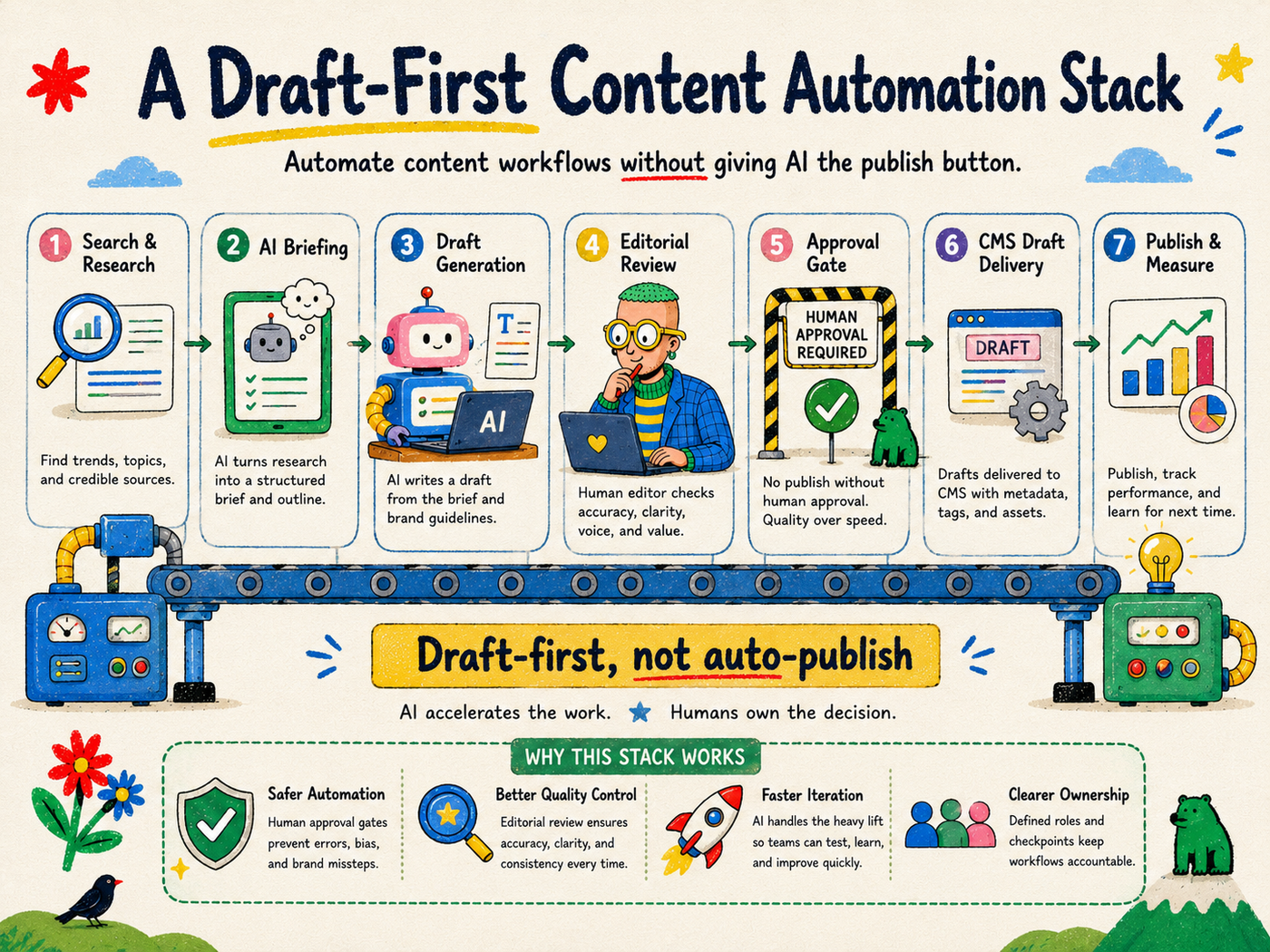
A practical workflow could be:
1. System identifies an opportunity
Search or content data creates a candidate task.
2. Agent collects evidence
The agent reads approved sources and current site content.
3. Agent creates a brief
The task becomes structured and reviewable.
4. Agent generates a draft
The draft is saved as a revision.
5. Automated checks run
Rules flag missing metadata, structural problems or destination issues.
6. Human reviews
The reviewer sees the current version, sources, warnings and changes.
7. System sends content to the CMS as a draft
The transfer is automated.
8. Human previews and publishes
The final production action stays explicit.
This preserves most of the speed benefit while reducing the blast radius of model errors.
An open-source content automation stack
You can build this with specialized tools instead of one large platform.
Search and SEO intelligence
Options include open-source platforms such as OpenSEO plus commercial data APIs where needed.
Web research
Use a crawler or extraction tool such as Firecrawl for cleaner web inputs.
Local or hosted models
Use Ollama for local inference or connect to hosted providers for stronger models.
Automation
Use n8n to schedule jobs, call APIs and route data deterministically.
Retrieval
Use a vector database such as Qdrant when the model needs semantic access to internal documents.
Observability
Use Langfuse or another LLM observability layer when model behavior needs tracing and evaluation.
Content operations
Use BlogFactory to manage the transition from research and agent work to revisions, review and CMS draft delivery.
The architecture can look like this:
Search data + sources → automation → AI agent → content operations → human review → CMS draft → publish
No single tool needs unrestricted access to every part of the system.
Rules and AI should work together
Not every automation step should be an agent.
A strong system separates deterministic and probabilistic work.
Use rules for:
- required fields
- schedules
- thresholds
- exact transformations
- schema validation
- destination mapping
- duplicate IDs
- access permissions
Use AI for:
- summarization
- classification with nuance
- research synthesis
- drafting
- editorial suggestions
- topic clustering
- explaining anomalies
This distinction makes workflows cheaper and easier to debug.
If a task has one objectively correct outcome, code is often better than a model.
Source grounding matters more as automation scales
A human writer may notice when research is weak.
An automated generation pipeline can turn weak research into hundreds of confident drafts before anyone notices.
Source management should therefore be part of the architecture.
Useful practices include:
- maintain approved source lists
- store source URLs with the task
- distinguish internal evidence from external research
- record when source material was collected
- avoid asking the model to invent citations
- require human verification for important factual claims
Automation multiplies both good process and bad process.
Revision safety matters
Imagine this sequence:
- An agent reads version A of a draft.
- An editor changes it to version B.
- The agent finishes its task and writes an update based on version A.
- The system blindly accepts the update.
The editor’s work may disappear.
This is a classic concurrency problem, not an AI-specific problem.
Content automation systems should use version-aware or optimistic-locking patterns so stale updates fail safely rather than overwriting newer work.
This type of infrastructure is less exciting than content generation, but it is critical for trustworthy automation.
Permission boundaries for content agents
An agent should not receive more authority simply because it is convenient.
A useful permission model separates capabilities.
Read
- content
- analytics
- search data
- approved sources
Draft write
- create draft
- update draft
- create metadata
Delivery
- create CMS draft
High-risk admin
- delete
- change credentials
- manage users
- publish live
Most content agents need the first two categories. Some workflows need delivery. Very few need the final category.
The smaller the permission surface, the smaller the blast radius.
Open source vs closed content automation platforms
Open source advantages
- inspectable code
- self-hosting
- custom integrations
- flexible model providers
- configurable permissions
- easier architectural composability
SaaS advantages
- faster setup
- managed infrastructure
- support
- less maintenance
- polished integrations
- easier onboarding
A hybrid approach is often best.
You can self-host the operational workflow while using external AI and SEO providers. Or you can use a SaaS CMS while keeping the agent control layer in your own infrastructure.
The useful question is not which ideology wins. It is which architecture preserves the control you actually need.
How BlogFactory handles content automation
BlogFactory is designed as a content operations layer rather than a fully autonomous publishing bot.
It brings together:
- source context
- content inventory
- drafts
- revisions
- SEO metadata
- Search Console workflows
- MCP agent access
- review and preflight
- CMS draft delivery
Its MCP connections are site-scoped, and the server keeps provider credentials outside the agent conversation.
Most importantly, the content delivery model is intentionally draft-only.
An agent can do meaningful editorial work and prepare a CMS handoff without being given a general live-publishing tool.
That makes the system suitable for organizations that want AI to execute more work while keeping humans responsible for what becomes public.
Example: automated content refresh pipeline
A practical refresh workflow could look like this.
Trigger
Search Console shows a meaningful decline for an existing page.
Evidence collection
The workflow pulls relevant queries, the current article, related internal pages and approved sources.
Diagnosis
An agent explains whether the issue appears to be content depth, intent shift, missing sections, weak CTR or something else that needs investigation.
Brief
The agent creates a focused refresh plan instead of rewriting the page blindly.
Draft
A new revision is generated.
Checks
The system validates metadata, required links and destination.
Review
An editor checks facts, usefulness and brand fit.
Delivery
The approved version is sent to the CMS as a draft.
Publication
A human previews and publishes.
Measurement
The page is monitored over an appropriate observation window.
This pipeline automates almost every repetitive step without pretending SEO outcomes are guaranteed or giving the model unrestricted production control.
How to start small
Do not begin by building an autonomous editorial department.
Choose one narrow workflow.
Good starting points include:
- refresh old articles
- create metadata for approved drafts
- generate briefs from a fixed research packet
- suggest internal links
- convert reviewed Markdown into CMS drafts
- summarize Search Console opportunities
Measure the error rate and review burden.
Then add authority gradually.
The right progression is:
assist → draft → act with approval → act within narrow boundaries
not:
connect admin credentials → hope the agent behaves
The future of content automation is controlled execution
Generative AI made content creation abundant.
Agent protocols and tool access are making execution abundant too.
The competitive advantage is therefore shifting toward systems that can decide what should happen, provide trustworthy context, constrain what agents may do and review the work efficiently.
Open-source content automation is compelling because it gives teams the ability to shape those boundaries themselves.
The goal is not to keep humans doing repetitive work forever.
The goal is to automate aggressively where automation is cheap to reverse — and remain deliberate where a mistake becomes public.
Explore BlogFactory on GitHub
BlogFactory is open source and self-hostable, with an MCP-based workflow for Search Console context, drafts, revisions, review and CMS draft delivery.
Inspect the architecture, run it locally or contribute: