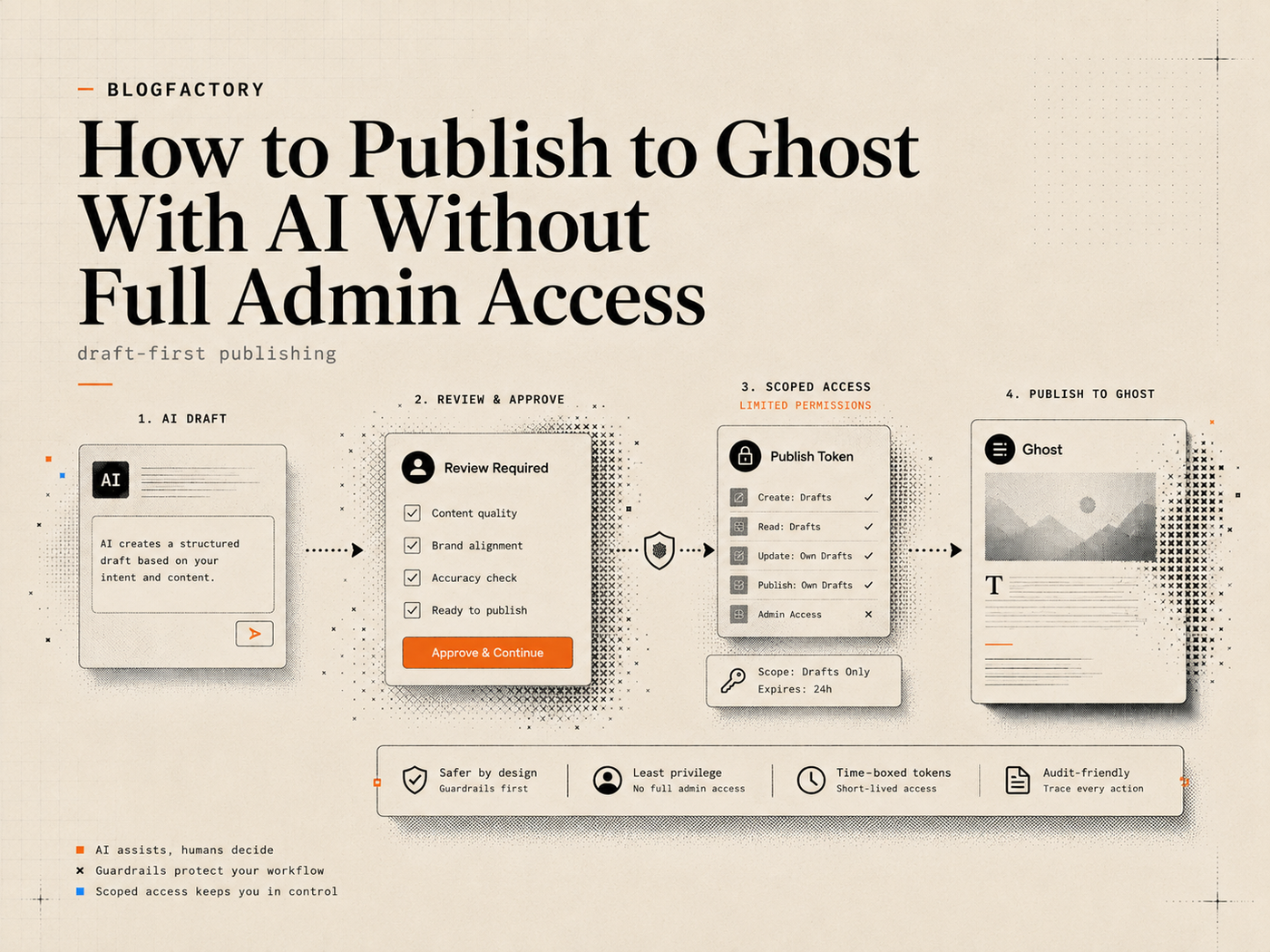
You can publish to Ghost with AI without making the client a full Ghost administrator. Expose a narrow tool set, keep credentials outside the conversation, create drafts, require revision-aware previews, and confirm scheduling or publishing separately.
This limits the consequences of a bad instruction, stale draft, wrong target, or compromised workflow.
Key points
- Use a dedicated Ghost custom integration rather than a personal administrator session.
- Keep the Admin API key in a private local configuration or secret manager.
- Start with read-only access and add draft, schedule, or publish capabilities separately.
- Make draft creation draft-only.
- Require exact targets, current revisions, previews, and explicit approval for writes.
- Treat publishing, deployment, and public verification as separate operations.
- Do not automatically retry a write when the first result is uncertain.
Why full Ghost admin access is usually unnecessary
Ghost’s Admin API can manage much more than an article draft. Its documented integration endpoints cover posts, Pages, tags, images, newsletters, members, offers, tiers, users, themes, webhooks, and other site operations.[1]
That breadth is excessive when the job is limited to:
- reading an existing article;
- creating a new draft;
- updating approved metadata;
- uploading a cover image;
- scheduling a reviewed post;
- publishing an exact draft;
- checking whether the public page rendered correctly.
Apply least privilege: expose the smallest capability set that lets the current workflow succeed.
A safer architecture for AI-to-Ghost publishing

A controlled publishing stack has four layers.
1. The AI client
The client helps research, draft, revise, or coordinate the workflow. It may be a desktop assistant, coding agent, or another MCP-compatible application.
2. A bounded tool layer
A local MCP server exposes named, structured tools. It decides what operations exist, validates their arguments, and blocks capabilities outside its scope.
3. The Ghost Admin API
The server communicates with Ghost using a custom integration. Ghost Admin API keys are secrets intended for secure server-side environments and are used to generate short-lived tokens for requests.[1]
4. Human approval
The operator reviews the draft, intended changes, schedule, or publication transition before higher-risk actions occur. A formal review and approvals workflow makes that decision visible.
The tool layer narrows the action, and human approval controls the transition. This is the core idea behind a content agent control plane.
Step 1: Create a dedicated Ghost custom integration
In Ghost Admin, create a custom integration for the publishing workflow. Do not reuse a key pasted into unrelated scripts or shared across many services.
Record which Ghost site the key belongs to so staging and production credentials cannot be confused.
Never include the Admin API key in:
- a prompt;
- chat history;
- a Git repository;
- an issue or support ticket;
- a screenshot;
- a command-line argument that may remain in shell history.
Enter the key privately during setup and store it in the client’s private configuration or a managed environment variable.
Step 2: Connect through a narrow local server
MCP is an open standard that lets AI applications connect to external tools and workflows.[2] A local MCP server can run as a process on the same machine as the AI client and communicate over standard input and output.
Local execution avoids entrusting the key to a hosted MCP service, but a malicious or vulnerable local dependency can still access the secret.
Before connecting production credentials, review the repository, package publisher, registered tools, logging and redaction, network requests, version management, and release process.
For Ghost publishing, prefer a server that deliberately excludes unrelated administration features.
Step 3: Begin with read-only access
The first successful connection should not create, edit, schedule, or publish anything.
A read-only profile can verify:
- the intended Ghost host;
- API compatibility;
- the current user-visible site information;
- access to exact posts and Pages;
- tags and public author identity;
- whether optional public URL templates are configured.
This proves that the client can discover the server and the server can reach the intended Ghost site. Stop if the returned site identity is wrong.
Step 4: Make creation draft-only
A content-generation command and a publication command should never be the same action. The create tool should always produce a Ghost draft, regardless of instructions embedded in the generated text.
Draft-only creation gives the editor a stable review point for facts, citations, title, excerpt, tags, authors, images, metadata, links, formatting, and brand review.
A bad draft is work to fix. A bad live post is a public incident.
Step 5: Read the exact target before changing it
Updates should begin by retrieving the exact post or Page by ID or unambiguous slug.
Do not let the AI guess which item the user meant from a fuzzy title alone when several posts are similar. The preview should name the exact target and show its current revision or `updated_at` value.
Revision awareness protects concurrent work. If another editor changes the post after the preview, the apply operation should fail rather than overwrite the newer version.
The write should be accepted only when the target still matches the reviewed version.
Step 6: Preview changes before applying them
For an existing item, separate planning from mutation. A useful preview describes:
- the target ID and title;
- current revision;
- fields that will change;
- whether the body will change;
- the exact replacement or inserted section;
- protected content that will remain untouched;
- the permission scope required;
- the resulting status.
For high-risk updates, a signed preview can tie approval to the exact change set. If the target or payload changes, the old approval should expire.
Step 7: Use separate permission profiles
A practical progression is:
Read-only
Inspect content, audit selected items, check site health, preview changes, and plan schedules without writes.
Draft editor
Create drafts, upload validated images, and apply approved changes while keeping scheduling and publishing unavailable.
Scheduler
Add guarded schedule and unschedule operations for exact drafts.
Publisher
Add explicit publish, unpublish, deploy, and published-metadata workflows.
Profiles should technically change which tools are registered. A missing publish tool is a stronger boundary than a prompt saying “please do not publish.”
Ghost Publisher MCP uses this profile-based approach. It is a local-first, unofficial Ghost integration maintained by BlogFactoryHQ, with a deliberately bounded publishing surface rather than a mirror of the complete Ghost Admin API.[3]
Step 8: Confirm the exact publication transition
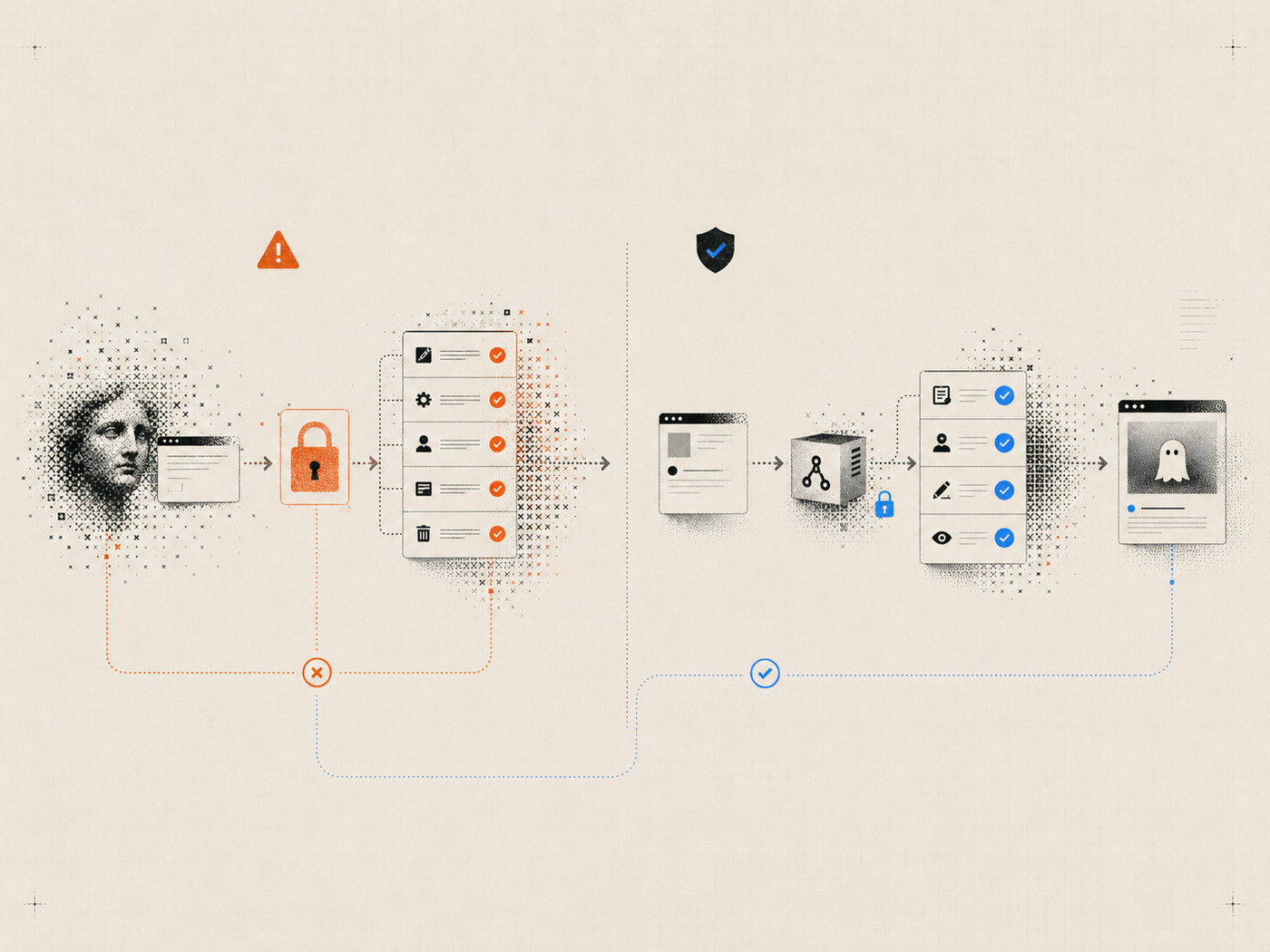
Publishing should require a separate confirmation that names what will happen.
Good confirmation language identifies:
- the exact post or Page;
- its current status and revision;
- the target status;
- whether a deployment hook will run;
- whether an email or newsletter will be sent;
- the number of items in the batch.
Newsletter sending should be absent from a content-only workflow. Preflight the entire batch before the first mutation so a stale item is discovered before anything publishes.
Step 9: Treat deployment as a separate operation
A Ghost API success does not always mean the new page is visible.
If the site uses a Ghost theme, the published page may appear immediately. If Ghost feeds a headless or static frontend, the workflow may need to trigger a deployment, revalidation, or rebuild.
A robust sequence is:
- publish the approved Ghost item;
- receive and record the Ghost result;
- trigger one configured deployment hook;
- do not automatically repeat the hook if the response is uncertain;
- check the public URL.
Separate steps help identify whether a failure occurred in Ghost, the build platform, CDN, or rendered page.
Step 10: Verify the live result
Readers experience the public page, so a bounded live check can verify:
- HTTP status;
- expected title text;
- canonical URL;
- configured meta title and description;
- the selected public post or Page URL;
- feature image availability.
The check should report only what it confirmed, not claim full visual correctness, indexing, accessibility, or SEO quality. A failed check should open an investigation, not automatically republish the post.
Why automatic write retries are dangerous
Retries are normal for read requests. They are riskier for mutations.
A timeout can occur after Ghost accepts a write but before the client receives the response. Repeating it may create a duplicate draft, trigger another deployment, or apply the same transition twice.
Safer write behavior is:
- stop after an uncertain result;
- re-read the exact target;
- determine whether the intended change already occurred;
- obtain a fresh revision;
- prepare a new preview if another write is still needed.
What a controlled workflow looks like in practice
The maintained Ghost Publisher project documents an operator-run workflow at Ortak Alan, a live Ghost publication. The case study describes draft creation, metadata correction, image upload, separately approved publishing, one deployment, and public verification. It reports a 336-piece public archive and a current cadence of five to six posts per day at the time of the August 2026 capture.[4]
The evidence is operational: the path supported reviewed batches while retaining draft-first creation and public checks. The case study is maintainer-reported and does not prove that the MCP alone caused search growth.
Safe content operations still depend on editorial decisions, source quality, review, architecture, and publishing discipline.
AI-to-Ghost publishing checklist
Before enabling writes:
- Create a dedicated Ghost integration.
- Confirm the production and staging hosts.
- Keep the key outside chats and repositories.
- Inspect the package and complete tool list.
- Pin or deliberately manage the installed version.
- Start with read-only access.
- Verify the connection without writing.
Before changing content:
- Select an exact post or Page.
- Read the current revision.
- Preview the complete change set.
- Protect unrelated body structures.
- Confirm the required permission scope.
- Reject stale revisions.
Before publishing:
- Review facts, citations, metadata, images, and links.
- Confirm the exact status transition.
- Preflight the whole batch.
- Verify that newsletter sending is not part of the operation.
- Trigger deployment separately when required.
- Check the public result.
- Investigate uncertain writes instead of retrying automatically.
Frequently asked questions
Can ChatGPT, Claude, Cursor, or Codex publish to Ghost?
An MCP-compatible client can call a Ghost publishing server when it is configured locally or remotely and the relevant tools are enabled. Client support and setup details vary.
Does a custom integration have limited Ghost permissions?
Ghost integrations have a documented fixed endpoint set, but that set is still broader than many editorial workflows need.[1] A bounded server can expose only a smaller subset to the AI client.
Should AI ever receive publisher access?
Publisher access can be appropriate for a reviewed, explicit workflow. It should not be the default for research, drafting, audits, or first-time setup.
Can draft creation accidentally publish?
A well-designed draft creation tool should hard-code draft status and expose publishing as a separate operation.
What happens if an editor changes the post after approval?
The apply or publish operation should detect the changed revision and stop. The workflow then needs a new read, preview, and approval.
Is local-first publishing completely secure?
No. It avoids entrusting the key to a hosted connector, but the local package, client configuration, machine, dependencies, and Ghost integration still require security review.
The practical takeaway
Publishing to Ghost with AI does not require giving the AI every capability available in Ghost Admin.
Use a dedicated integration, keep the key private, expose a narrow local tool surface, start read-only, create drafts without publication authority, require revision-aware previews, and confirm exact transitions separately.
Then treat the Ghost write, frontend deployment, and public result as three different things to verify.
The objective is faster editorial execution with a clear boundary around AI authority and a human decision before content becomes public. See open-source content automation and what a Ghost MCP server is.